

Most SaaS onboarding checklists have a completion problem, but not the one teams usually diagnose. The problem is not that users abandon checklists midway. It is that users complete them and still do not activate.
When that happens, the instinct is to shorten the checklist, rewrite the copy, or add a progress bar. None of those changes address what is actually broken. A checklist that produces completion without activation was designed around the wrong objective from the start. It was built to move users through features, not to move users toward a specific outcome.
That is an architectural failure, not a copywriting one.
The checklist framework below operationalizes a three-stage onboarding system built around Setup, Activation, and Adoption. The design principles that follow are what separate a checklist that drives activation from one that produces compliance: high task counts, low revenue impact.
Why Most Checklists Fail: Three Design Errors
The following three structural failure modes appear consistently in SaaS onboarding checklists. Each one has a corresponding architectural fix.
Failure Mode 1: Feature-completion bias
Most checklists are built by product teams working from a feature map, not an activation map. The result is a checklist sequenced around what the product does rather than what the user needs to accomplish to reach their first meaningful outcome. Steps like "Explore the dashboard," "Try the reporting tab," and "Set up your profile" add checklist length without shortening the path to activation. The fix is sequencing every checklist item around the activation moment and cutting anything that does not serve that path.
Failure Mode 2: Role blindness
A single checklist assumes all users arrive with the same context, intent, and level of readiness. They do not. An end user invited to a platform that their team's administrator already configured has a fundamentally different starting point than that administrator. Presenting both with identical steps creates friction for one and redundancy for the other. The fix is a modular checklist structure: a core layer that applies universally, plus conditional items that surface based on role, use case, or behavioral signal.
Failure Mode 3: The completion-as-activation fallacy
A completed checklist is not an activation event. It is a task event. The two are only equivalent if every item on the checklist is directly connected to the activation moment, and most are not. Teams that track checklist completion as a proxy for activation are measuring the wrong thing. The fix is redefining what completion means: not task count, but confirmed behavioral outcome.
The Architectural Question Behind Every Checklist
Before sequencing a single checklist item, there is one question that has to be answered: what is the minimum set of actions that gets this user to their activation moment as efficiently as possible?
That question functions as a design constraint. Every proposed checklist item has to pass through it. Steps that contribute to reaching the activation moment stay. Steps that do not are removed, regardless of how useful the underlying feature is, or how much the product team wants users to discover it during onboarding.
This constraint is the Minimum Viable Path to Activation (MVPA). It is not a philosophy. It is a sequencing filter.
Here is how to apply it in practice. Start by defining the activation moment precisely: the specific action or combination of actions that correlates with long-term retention in your product. This is not "completing the tutorial" or "logging in three times." It is a behavioral threshold: the first time a user has experienced meaningful value. For a project management tool, it might be creating a task and assigning it to a team member. For a reporting platform, it might be generating a first custom report and sharing it. For an AI avatar tool like Captions.ai, it is the moment a user renders and previews their own custom avatar for the first time, because that is the instant the product's core value becomes personal and visceral rather than theoretical.
Once the activation moment is defined, work backwards. What does a user need to have done immediately before that moment? What needs to be true before that? Continue until you reach account creation. The resulting sequence is your MVPA, the backbone of an activation-sequenced checklist.
Everything outside that sequence is a candidate for removal or deferral to post-activation onboarding.
Modular Checklist Architecture
A modular checklist has two structural layers, plus suppression logic that prevents irrelevant steps from surfacing.
The Core Layer
The core layer contains the universal steps every user must complete to reach the activation moment, regardless of role or use case. These items are non-negotiable and non-conditional. They represent the MVPA in its most compressed form.
Core layer items should be few. If the core layer exceeds five to seven items, the MVPA filter has not been applied rigorously enough. Each item should represent a single, discrete action with a clear behavioral completion state, not a category of exploration.
The Conditional Layer
The conditional layer contains items that surface based on role, use case, or behavioral signal. These items do not appear for every user. They appear when a specific condition is met.
For end users specifically, the conditional layer typically activates after the administrator has completed workspace setup. The end user's checklist should not include configuration steps that were already handled upstream. Instead, it surfaces the steps specific to that user's context: connecting their own integrations, personalizing their view, completing their first relevant action within the workspace their administrator built.
Tip: use your existing account data to define conditional layer variants before you build them. Most teams design role-based checklist items from assumption rather than evidence. A faster approach is to analyze your current account base for team composition patterns: what roles appear together most frequently, which roles generate the most product activity, and which users tend to reach activation fastest. AI can accelerate this by running pattern analysis across your CRM or product data to surface role clusters you may not have identified manually. If you want a dedicated tool for this, Mixpanel, Amplitude, and Heap all support behavioral cohort segmentation that maps directly to this kind of role and usage pattern analysis. The output informs which conditional items to build and in what sequence to surface them.
How behavioral triggers inform which conditional items surface, and when, is a function of your GTM motion and user segmentation strategy. The same logic that governs role-based lifecycle messaging applies directly to checklist architecture. The sequencing of conditional items across the Setup, Activation, and Adoption stages follows the same three-phase model that structures the broader onboarding system.
Suppression Logic
Suppression logic hides or marks as complete any checklist item whose underlying action has already been performed, whether by the current user or by someone else in the account.
This matters more than most teams realize. A new end user who is invited into a platform where data has already been imported, integrations have already been connected, and the workspace is already configured should not see a checklist that asks them to do those things. Showing completed upstream actions as open tasks creates cognitive friction and erodes trust in the checklist as a useful guide. Suppression logic eliminates that friction by matching checklist state to actual account state in real time.
Completion Signal Design
There are three distinct types of checklist completion, and most SaaS platforms are only tracking one of them.
Task completion is recorded when a user clicks a checklist item or marks it done. It tells you that the user acknowledged the step. It tells you nothing about whether the underlying action occurred.
Behavioral completion is recorded when the system confirms that the underlying action actually happened. A user who checks off "Connect your calendar integration" has task-completed that item. A user whose calendar is now actively syncing has behavioral-completed it. The distinction matters because task completion can be gamed, skipped, or clicked through without engagement. Behavioral completion cannot.
Activation completion is recorded when a user reaches the defined activation threshold: the outcome the entire checklist was designed to drive. This is the completion signal that matters for revenue, and it is the one that most checklists do not measure at all.
An activation-sequenced checklist tracks all three, but prioritizes the third. Behavioral completion is used as verification: the system confirms that each MVPA step was genuinely completed before the next item unlocks. Activation completion is the signal that determines whether the checklist succeeded.
This is also where Time-to-Value enters the measurement framework. A well-designed checklist protects TTV by removing friction on the path to activation. The time between a user's first login and their activation completion is the metric the checklist should be optimizing. Checklist completion rate is a leading indicator. Activation completion within a defined TTV window is the outcome metric.
Modular Checklist: Illustrated Example
The following is a structured illustration of modular checklist architecture applied to a hypothetical B2B SaaS collaboration platform. The three-layer structure of Core Layer, Conditional Layer, and Suppression Logic applies across SaaS verticals: fintech, martech, AI tools, devtools, HR tech, and beyond. What changes between verticals is the content of each layer and the definition of the activation moment. The architecture itself does not change. This is a framework demonstration, not a plug-and-play template. The specific items, sequence, and conditional logic should be rebuilt from your own activation data.
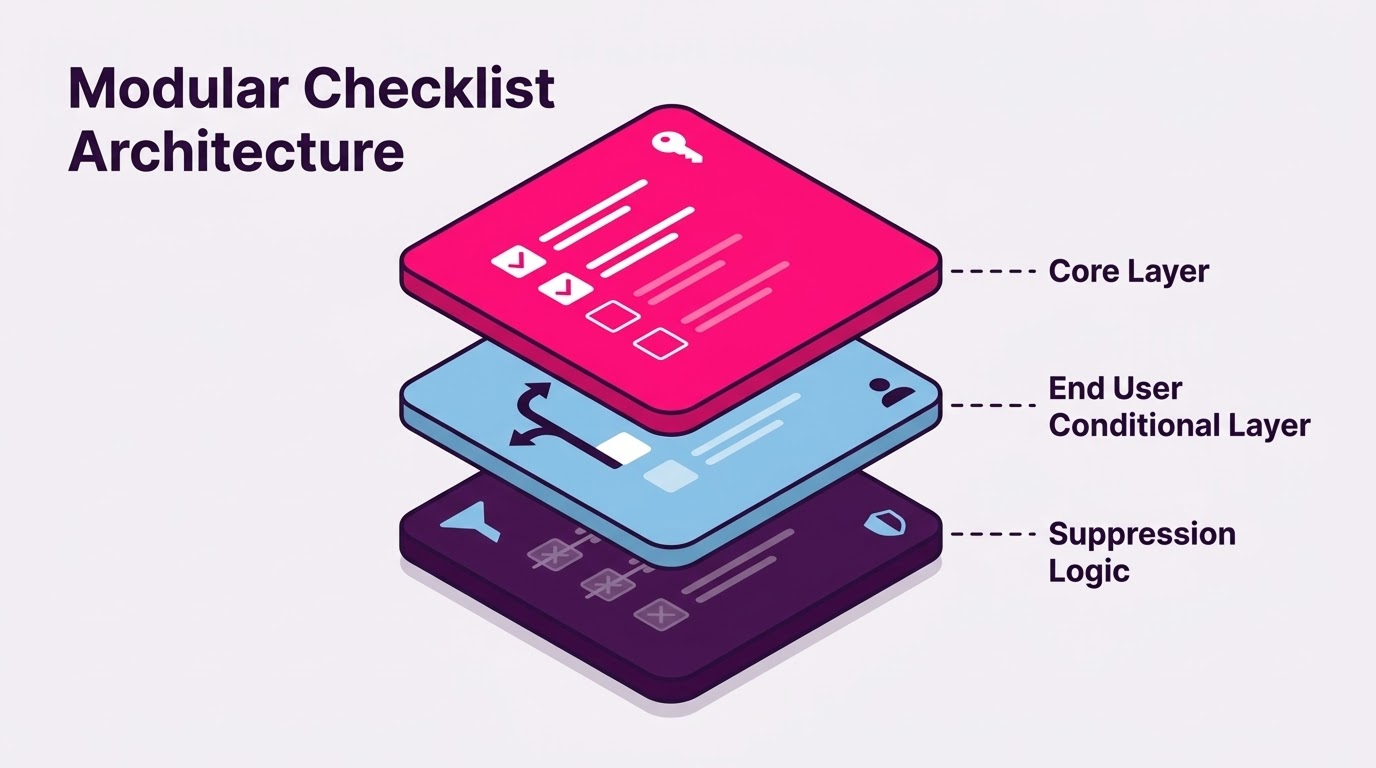
CORE LAYER (All users, surfaces immediately at first login)
- Verify your email address
Behavioral completion: email link clicked and confirmed - Set your display name and notification preferences
Behavioral completion: profile record updated in system - Complete your first primary action in the platform
Behavioral completion: action logged in activity feed
(For this platform: create or respond to a shared workspace item) - Invite or connect with at least one other user
Behavioral completion: invitation sent or connection confirmed
END USER CONDITIONAL LAYER (Surfaces after administrator has completed workspace setup, confirmed via account state)
- Review the workspace your team has already configured
Behavioral completion: workspace page visited for minimum 30 seconds - Personalize your notification and view settings
Behavioral completion: at least one preference updated - Complete your first collaborative action within the team workspace
Behavioral completion: action attributed to this user logged in shared workspace activity
SUPPRESSION LOGIC NOTES
- Items 1 and 2 are suppressed if the user was provisioned via SSO with profile data pre-populated
- Item 4 is suppressed if the user was invited by a team member (connection already exists by definition)
- End User Conditional Layer items 5 and 6 are suppressed if account-level setup is not yet complete. They do not surface until the administrator's core layer is finished
Activation completion threshold for this platform: End user has completed at least one collaborative action within a shared workspace within 72 hours of first login.
How This Connects to Growth Architecture
A checklist is one component in a broader Growth Architecture. It does not operate in isolation, and its performance cannot be evaluated in isolation either.
It is also worth stating directly: not every SaaS product needs an in-app checklist. Products with a single-action activation path, highly guided UI flows, or low-complexity onboarding may not need one at all. What every product does need is a defined activation sequence. A checklist is one delivery mechanism for that sequence. The framework in this article applies when a checklist is the right tool for your onboarding architecture, not as a premise that every SaaS should have one.
When checklist completion rates are high but trial-to-paid conversion is stagnant, the most common cause is an Activation Leak at the boundary between checklist completion and actual product engagement. The checklist moved users through steps. It did not move them into the habit of using the product. That is a sequencing problem, and it surfaces when checklists are designed around feature coverage rather than the activation moment.
The MVPA filter, modular architecture, and behavioral completion signals described above are not checklist improvements in isolation. They are components of an onboarding system designed to eliminate Activation Leak at the point where most SaaS platforms lose users: between signup and first meaningful value.
The measure of a well-designed checklist is not its completion rate. It is the percentage of users who complete it and then activate within the defined TTV window. If those two numbers diverge, the checklist is measuring compliance. The onboarding system is measuring activation. They are not the same thing, and treating them as equivalent is one of the most common and costly errors in SaaS onboarding design.
The Difference Shows Up in Revenue
Companies that audit their onboarding checklists against activation data, not completion rates, consistently find a gap between what the checklist is tracking and what the product actually needs users to do. That gap is where Activation Leak lives.
Closing it requires the same discipline as any other growth problem: define the outcome precisely, sequence the system around it, and measure what actually matters.
If your current checklist was built before your activation moment was formally defined, it was built around the wrong constraint. Rebuilding it around the MVPA is one of the highest-leverage moves available in early-stage SaaS onboarding, and one of the most consistently overlooked.
If you are unsure where your activation leak is, or whether your onboarding system is sequenced around the right moment, the HookOps Growth Audit is designed to surface exactly that. Start the conversation.